

FlexClip’s Intelligent Editing Upgrade: A Formal Review of AI Recreate and Auto Edit
In the rapidly progressing landscape of online video creation, efficiency and automation have become essential qualities for any modern editing platform. FlexClip—already well-established for its simplicity and versatile cloud-based workflow—has recently introduced two new AI-enhanced features: AI Recreate and Auto Edit. These additions mark a significant upgrade, positioning FlexClip as a more intelligent and adaptive tool for users who require speed, accuracy, and creative flexibility.
This review provides a detailed analysis of these features, their performance in practical scenarios, and how they contribute to a more streamlined editing experience.
Overview of FlexClip as a Creative Platform
FlexClip has consistently been recognized for its user-friendly interface, extensive media library, and intuitive editing tools suitable for beginners and professionals alike. The platform’s strategic focus has long been to reduce friction in the editing pipeline—allowing users to create polished videos without facing the complex learning curve of traditional software.
With the introduction of AI-powered functionalities, FlexClip aims to elevate its capabilities from a convenient editing tool to a more intelligent and proactive creative assistant.
Introducing AI Recreate: An Advanced Template Transformation Tool
What AI Recreate Does
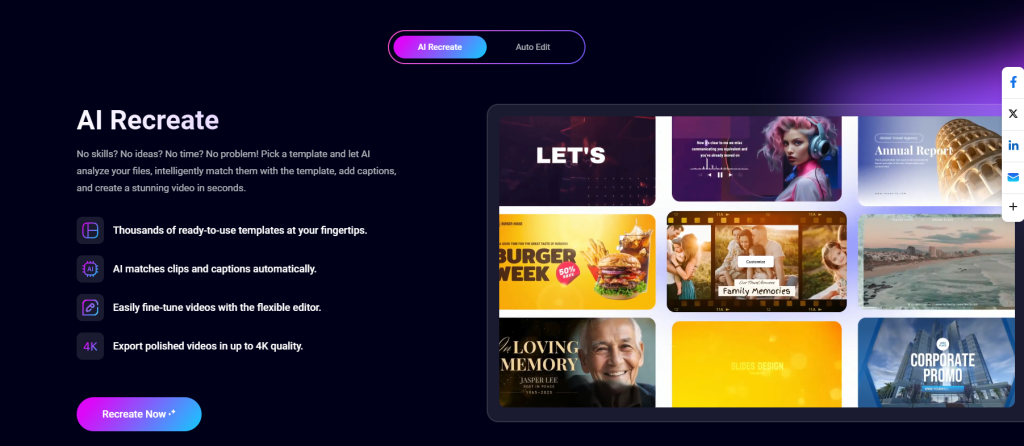
AI Recreate is designed to reformat and redesign existing templates with minimal manual input. Users can select a template they like and instantly generate new variations with updated layouts, styles, or visual structures. Instead of editing every component individually—text blocks, animations, transitions, or visual elements—AI Recreate interprets the design logic and produces alternative versions automatically.
Key Advantages
a. Time Efficiency
Where traditional customization requires extensive manual adjustments, AI Recreate shortens the process to just a few clicks. It is especially helpful for marketers, educators, and social media managers who often need multiple versions of the same content.
b. Consistency in Visual Identity
The feature ensures that each regenerated version maintains stylistic coherence, which is crucial for brand consistency across platforms.
c. Creative Expansion
AI-generated variations allow users to explore new creative directions they may not have considered. This often results in fresher and more dynamic outcomes.
Performance Evaluation
During testing, the feature performed impressively in adapting templates for different aspect ratios, social channels, and thematic styles. The generated outputs were clean, balanced, and visually appealing, reducing the need for additional adjustment.
Auto Edit: A Smarter Approach to Video Assembly
Functionality Overview
Auto Edit leverages AI to analyze raw footage and generate a structured video sequence automatically. This includes selecting relevant clips, trimming unnecessary segments, organizing scenes, and placing transitions or text where appropriate.
Core Benefits
a. Automated Clip Selection
The system intelligently identifies the most impactful moments in the uploaded video content, which is particularly useful for event recaps, product demos, interviews, and casual vlogs.
b. Professional-Grade Structure
Auto Edit applies narrative logic—beginning, middle, and end—to create a coherent flow, sparing users from building the storyline manually.
c. Reduction of Editing Complexity
Users who lack experience with multi-layer editing or visual composition benefit from having a polished base draft generated instantly.
Evaluation of Output Quality
Auto Edit delivered sequences that required only minimal fine-tuning. The transitions were smooth, pacing was natural, and clip arrangement followed professional editing conventions. While users may still choose to refine the details, the feature provides a robust foundation that accelerates the entire workflow.
Synergy Between AI Recreate and Auto Edit
The real strength of these new features emerges when they are used together. For example, a user can first apply Auto Edit to assemble raw footage into a structured video. Then, they can leverage AI Recreate to produce multiple stylistic variations for different distribution needs—such as social media formats, branded versions, or thematic adaptations.
This synergy drastically reduces repetitive work and supports rapid content production, especially valuable for businesses and content teams operating under tight schedules.
User Experience and Interface Design
FlexClip continues to excel in providing a clean, uncluttered interface. Both AI Recreate and Auto Edit are seamlessly integrated into the workflow, with clear instructions and unobtrusive design. The system’s responsiveness and cloud-based processing also contribute to a smooth experience without taxing device performance.
Additionally, because these features require no technical expertise, they are accessible to creators at all skill levels.
Final Assessment
FlexClip’s introduction of AI Recreate and Auto Edit represents a significant advancement in its evolution as an intelligent video editing platform. Both features are not only functional but genuinely transformative, enabling users to save time while maintaining quality and creative freedom.
With these tools, FlexClip successfully shifts from being a convenient editor to a truly adaptive AI-driven system. For individuals and teams who value efficiency without sacrificing design quality, these upgrades make FlexClip an even more compelling choice in 2025.